
AI Chatbots in 2026: The Complete Guide to ChatGPT, Claude, Gemini & More
AI chatbots 2026 have become some of the most useful tools on people’s phones. What started as a novelty a few years ago… What started as a novelty a few years ago — a chat window that could answer questions — has turned into something people rely on daily: for writing help, quick research, studying, coding, and even everyday decisions like planning a meal or drafting a message.
The AI chatbots 2026 landscape has matured into a handful of clear leaders, including ChatGPT, Claude, and Gemini, plus a growing ecosystem of Android and iPhone apps. But with so many options, each with their own free and paid tiers, it’s easy to end up using the wrong tool for the job, or missing out on features that would genuinely save time.
This guide brings together everything Qubee Online has covered on AI chatbots into one place — what each major chatbot does well, how to set them up on your phone, how to write prompts that actually get useful answers, and how to use these tools responsibly as a student. Every section below links to a full, in-depth guide if you want to go deeper on that specific topic.
What Is an AI Chatbot, Exactly?
An AI chatbot is a computer program that can hold a natural, back-and-forth conversation with you — answering questions, writing text, explaining concepts, or helping you think through a problem — in plain language, the same way you’d talk to a person. Unlike the rigid customer-service chatbots of a decade ago that could only follow scripted menus, today’s AI chatbots are powered by large language models: systems trained on enormous amounts of text that let them understand context, follow complex instructions, and generate original responses on the fly.
The practical result is a tool that can draft an email, summarize a long document, explain a difficult homework question, help debug a piece of code, or just answer a curious question — all in the time it takes to type a sentence. That flexibility is exactly why AI chatbots have spread so quickly across students, professionals, and casual phone users alike.
Understanding how AI chatbots 2026 work is useful because these tools are now being used for everything from education and writing to coding and everyday research.
AI Chatbots 2026: ChatGPT vs Claude vs Gemini
When comparing AI chatbots 2026, there is no single winner for every type of user.
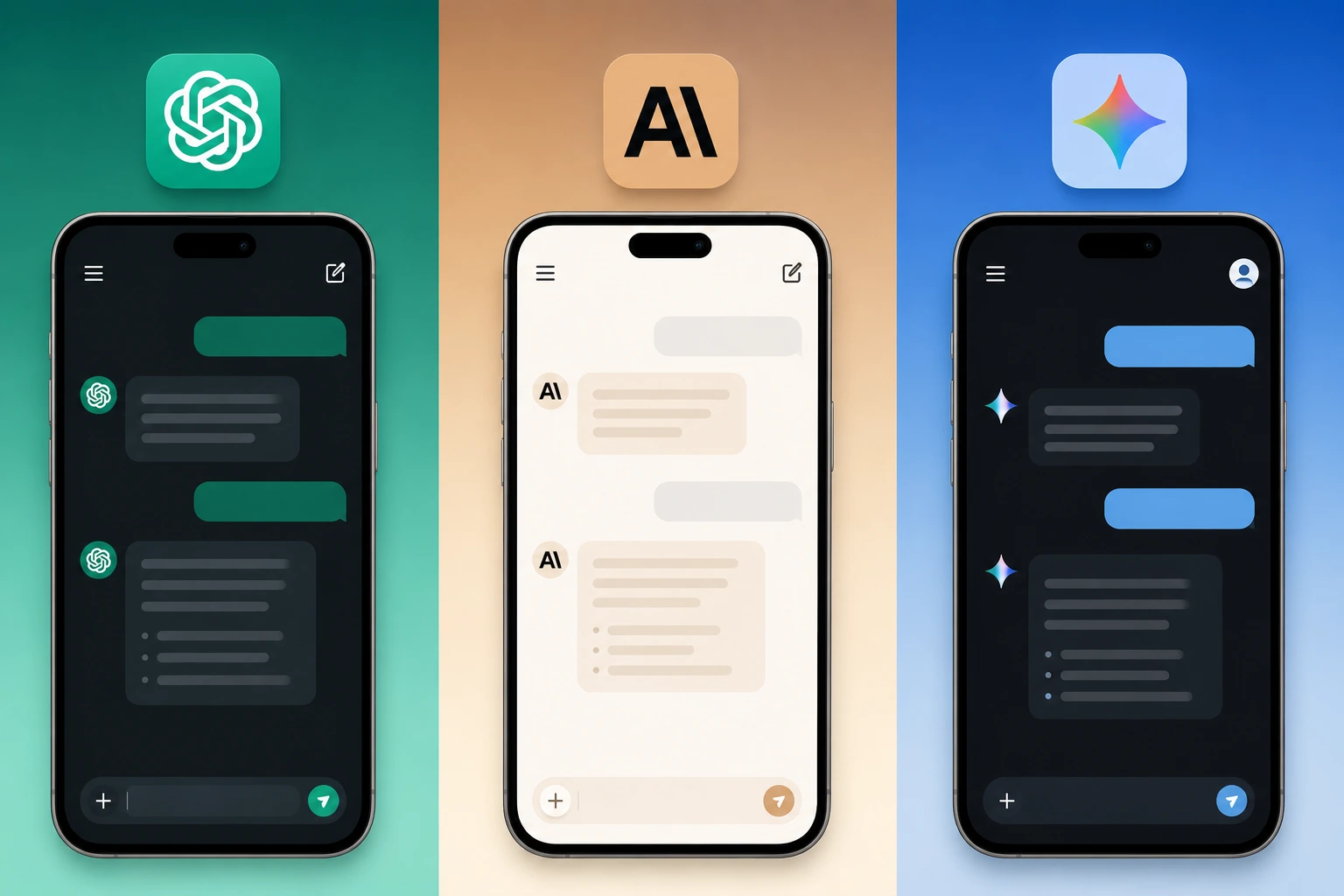
Three names dominate the AI chatbot landscape in 2026, and each comes from a different company with a slightly different philosophy:
- ChatGPT, built by OpenAI, is the most widely recognized and most broadly integrated — it shows up inside apps, browsers, and third-party tools across the internet, and has the largest ecosystem of plugins and extensions built around it.
- Claude, built by Anthropic, has built a reputation for careful, well-reasoned, and naturally written responses — particularly strong for longer writing tasks, nuanced analysis, and working through multi-step problems.
- Gemini, built by Google, has the deepest integration into everyday tools people already use — Gmail, Google Docs, Android’s voice assistant — making it convenient if you’re already inside the Google ecosystem.
All three offer capable free tiers alongside paid subscription plans that unlock faster responses, higher usage limits, and access to more advanced models. Which one is genuinely “best” depends heavily on what you’re using it for — a student summarizing lecture notes has different needs than a developer debugging code, or someone drafting a business email on their commute.
We’ve broken down the practical differences — pricing, strengths, and which one fits which use case — in our full head-to-head comparison: ChatGPT vs Google Gemini vs Claude: Best AI Compare.
Getting Started with Claude AI
If you’re newer to AI chatbots or have only used ChatGPT before, Claude is worth trying specifically for tasks where quality of writing and depth of reasoning matter — long-form writing, working through complicated questions step by step, or getting a second opinion on a piece of analysis.
Claude offers a genuinely useful free tier, enough for most everyday use without ever needing to pay. Setting it up takes just a couple of minutes: sign up with an email address, verify your account, and you’re immediately in a chat window ready to use.
For a full breakdown of what Claude actually is, how it differs from other chatbots, and what it’s particularly good at, read: What Is Claude AI? Complete Guide to Anthropic’s AI.
If you specifically want to know what’s included in the free plan, how to sign up, and any limitations to be aware of, see: How to Use Claude AI for Free in 2026.
Using ChatGPT on Mobile
For most people, the phone is where AI chatbots actually get used — between classes, during a commute, or while cooking dinner and needing a quick answer. ChatGPT has dedicated apps for both iPhone and Android that go noticeably beyond the basic web version, including voice conversations (where you can literally talk to it and hear a spoken response back), image uploads (ask it about a photo you’ve taken), and offline access to your past conversation history.
Setting it up is straightforward, but there are a few settings worth knowing about from the start — particularly around what’s included free versus what requires the paid plan, and how to manage notifications so the app doesn’t become distracting.
Our full step-by-step walkthrough covers installation, account setup, and getting the most out of the mobile app: How to Use ChatGPT on Your Phone in 2026.
Using Gemini on Android
For Android users, AI chatbots 2026 offer several practical options, from dedicated ChatGPT and Claude apps to Google’s deeply integrated Gemini experience.
Because Gemini is built by Google, it comes with an advantage no other chatbot can fully match on Android: deep, native integration. Gemini can be set as your phone’s default voice assistant (replacing the older Google Assistant), work directly inside Gmail to help draft replies, summarize long email threads inside Google Docs, and even reference information from your other Google apps when you give it permission to.
For anyone whose digital life already runs through a Google account — which is most Android users — this tight integration can make Gemini feel less like a separate app and more like a smarter layer over tools you already use every day.
Our guide walks through the setup process and highlights the features most worth knowing about: How to Use Gemini AI on Android in 2026.
Best AI Chatbots 2026 for Android
Beyond the three major names, the Google Play Store now has a genuinely large number of AI chatbot apps — some are official first-party apps, others are third-party apps built on top of the same underlying AI models, offering different interfaces, extra features, or simpler, ad-supported free access.
Not all of them are worth installing — some are low-quality wrappers with intrusive ads or weak functionality. We tested a wide range and picked out the ones actually worth your storage space, focusing on genuine usefulness rather than app store ratings alone.
See the full ranked list here: 10 Best Free AI Chatbots for Android in 2026.
Best AI Chatbots 2026 for Students
For students, AI chatbots 2026 can work as study assistants, writing helpers, research companions, and personalized tutors when they are used responsibly.
Students have become one of the largest groups of AI chatbot users — and for good reason. Used well, an AI chatbot can explain a confusing concept in simpler terms, help organize study notes, summarize a long reading assignment, or act as a patient tutor available at any hour. Used poorly, it can become a shortcut that skips the actual learning — which is worth being honest with yourself about.
The healthiest approach most educators recommend: use AI chatbots to understand material better, not to avoid engaging with it — ask it to explain a concept a different way, quiz you on what you’ve learned, or help you outline an essay you’ll still write yourself, rather than asking it to write the final answer for you.
We rounded up the most useful free AI tools specifically for student use cases in Best Free AI Apps 2025 for Students.
AI Chatbots 2026: How to Write Better Prompts
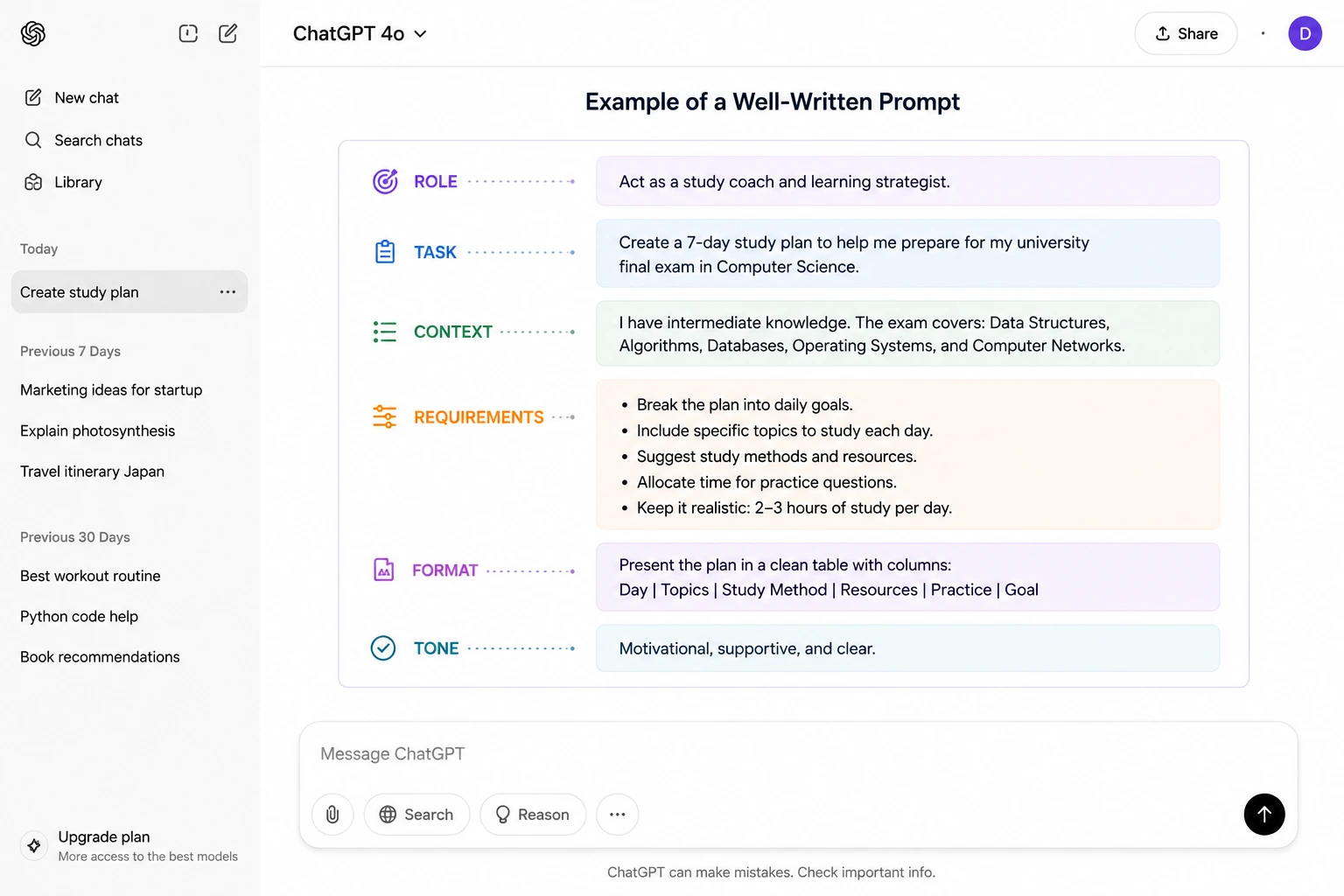
Here’s something most casual users never learn, and it makes a bigger difference than switching between chatbots: the quality of your prompt (what you type in) usually matters more than which AI chatbot you’re using. A vague question gets a vague, generic answer. A clear, specific prompt — with context about what you actually need, the format you want the answer in, and any constraints — gets a dramatically more useful response.
A few quick habits that make a real difference:
- Give context, not just a question — tell it who the answer is for, or what you’ll use it for
- Specify the format you want — a list, a short paragraph, a table, a formal tone
- Ask it to think step by step for anything complex, like math or multi-part problems
- Iterate — treat the first response as a draft, and ask follow-up questions to refine it
Our full guide breaks this down with real, practical examples you can copy and adapt: How to Write the Perfect AI Prompt for ChatGPT.
Staying Aware: Detecting AI-Generated Content
As AI chatbots get better at writing in a natural, human-sounding way, it’s become genuinely harder to tell AI-written text apart from something a person wrote themselves. This matters in a few real situations: teachers checking whether an assignment was actually written by a student, readers trying to gauge the trustworthiness of an article, or anyone who simply wants to know what they’re reading.
There are patterns and tools that can help — certain phrasing tendencies, overly uniform sentence structure, and dedicated AI-detection tools that analyze text for these signals, though none are perfectly reliable.
We cover the practical signs to look for and the tools available in How to Detect AI-Written Content in 2026.
Whether you’re choosing your first chatbot or comparing several services, this guide to AI chatbots 2026 can help you decide which tool fits your needs.
Frequently Asked Questions
Is ChatGPT free to use? Yes. ChatGPT offers a free tier with access to a capable model, enough for most everyday tasks. A paid subscription unlocks faster response times, higher usage limits, and access to more advanced models.
Which AI chatbot is best for coding? Claude and ChatGPT are both strong choices for coding help, including writing, debugging, and explaining code. Many developers simply use whichever one they already have a subscription to, since the practical difference for everyday coding questions is often small.
Which AI chatbot is best for students in 2026? There’s no single best option — Claude and ChatGPT are both well-suited for studying and writing help, while Gemini has an advantage for students already using Google Docs and Gmail for schoolwork.
Can I use more than one AI chatbot at the same time? Yes. Many people use different chatbots for different tasks — for example, one for writing help and another for quick factual questions. There’s no restriction on using multiple free tiers side by side.
Do AI chatbots work without an internet connection? Most mainstream chatbots, including ChatGPT, Claude, and Gemini, require an internet connection since they run on remote servers. Some limited offline AI tools exist for specific, narrower use cases.
Is my data safe when I use an AI chatbot? Reputable providers like OpenAI, Anthropic, and Google publish privacy policies explaining how conversations are stored and used. It’s worth reviewing the specific policy of whichever chatbot you use, and avoiding sharing sensitive personal information in any chat.
Do I need to pay for AI chatbots in 2026? No — the free tiers of ChatGPT, Claude, and Gemini are all genuinely capable for most everyday tasks. Paid plans mainly help with speed, higher usage limits, and access to the most advanced models for demanding tasks.
Can AI chatbots make mistakes? Yes. AI chatbots can occasionally state incorrect information confidently, especially on very specific facts, recent events, or niche topics. It’s good practice to double-check anything important, particularly for research, medical, legal, or financial questions.
What are the best AI chatbots in 2026? The leading AI chatbots in 2026 include ChatGPT, Claude, and Gemini. Each has different strengths, so the best choice depends on whether you need writing help, coding assistance, research, studying, or integration with other apps.
AI Chatbots 2026: Final Thoughts
AI chatbots 2026 are no longer experimental tools that are useful only for tech enthusiasts. ChatGPT, Claude, Gemini, and other assistants can now help with studying, writing, coding, research, and everyday tasks.
my happy