


How to Run AI Offline in 2025 – Complete Beginner’s Guide
Run AI Without Internet? Here’s How Google’s Edge Gallery Makes It Possible in 2025
Introduction
Artificial Intelligence (AI) is usually connected to the cloud—but what if you could run powerful AI models directly on your phone, even without internet? That’s exactly what Google AI Edge Gallery offers in 2025. In this guide, we’ll explore what it is, how to install it, how it works offline, and why it’s a major leap for mobile users where internet access can be limited.
Run AI on your phone without internet using Google AI Edge Gallery app in 2025
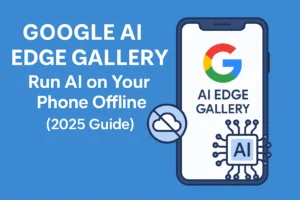
What is Google AI Edge Gallery and How it Run AI offline?
Google AI Edge Gallery is a new open-source app developed by Google that allows you to run lightweight AI models directly on your Android device—no internet connection required after setup. It’s designed for privacy, speed, and accessibility, especially in regions with limited or expensive data.
Google quietly released it on GitHub under an Apache 2.0 license, meaning it’s free, customizable, and open to developers and tech users around the world.
Key Features of Google AI Edge
Run AI Models Offline
Download and run models directly on your device without cloud dependency.
Ask Image Tool
Upload an image and ask questions about its content (e.g., “What is in this photo?”).
Prompt Lab
Generate summaries, write code, rewrite text, or create content with short prompts.
No Login Required
The app runs entirely locally—no Google account or cloud login needed.
Available AI Models
Gemma 3n by Google
Lightweight model designed to run on phones with just 2–3 GB RAM.
Qwen Model
Another efficient open-source model compatible with mobile inference engines.
More models expected soon, as the project is open to community contribution.
System Requirements
Android device (minimum 4 GB RAM; 6 GB+ recommended)
Latest version of Android 12 or higher
App is currently sideloaded via APK, not on the Play Store yet
iOS version is reportedly in development
Why It Matters?
Works Without Internet: Ideal for remote areas and students without reliable access
Saves Data: AI tasks like summarization or image recognition happen offline
Increased Privacy: Your data never leaves your phone—perfect for sensitive tasks
This app aligns with the growing need for offline digital tools in developing countries.
Pros and Cons of Google AI Edge Run AI offline
Pros
Works offline
No cloud login required
Fast on modern phones
Great for low-internet regions
Cons
Still in early development
Only available via side load for now
Limited models currently
Not yet beginner-friendly
Use Cases of Google AI Edge
Students: Summarize notes or answer questions from textbooks using Prompt Lab
Teachers: Use image question tools for visual learning in the classroom
Developers: Test models on-device before deploying to mobile apps
Travelers: Use AI privately without relying on mobile data or Wi-Fi
How It Compares to Cloud AI (e.g., ChatGPT, Gemini)
Google AI Edge Gallery
Internet needed – No
Privacy – High (local)
Speed – Instant (on-device)
Power consumption – Lower
Model size limits – Smaller models
Cloud AI (ChatGPT, Gemini)
Internet needed – Yes
Privacy – Lower (cloud-based)
Speed – Depend on connection
Power consumption – Higher
Model size limits – Larger models available
FAQ Section
Q1: Is this app safe to use?
Yes, it’s released by Google under an open-source license. Just download from trusted sources (GitHub).
Q2: Can I run large language models like GPT-3?
No. This app is optimized for smaller, efficient models that work on phones, like Gemma and Qwen.
Q3: Will it work on my phone?
If your phone has 4 GB RAM and Android 12+, it should run—but faster performance needs 6 GB or more.
Q4: Is it available on iPhone?
Not yet. iOS support is expected in the future.
Steps to Use Google AI Edge Gallery (Offline)
1. Open the App
Launch the AI Edge Gallery app from your phone’s home screen.
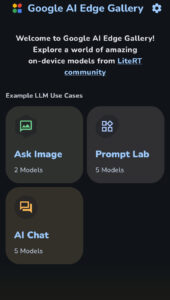
No account or login is required.
2. Choose a Tool
You’ll see three main features:
AI Chat
Ask Image
Prompt Lab
3. Download an AI Model
Before using any feature, you must install an AI model.
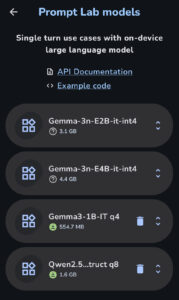
Here’s how:
Tap “Manage Models” or “Choose Model”
Select a model like:
Gemma 2B 3n
Qwen1.5
Tap Download
You may need a free Hugging Face account
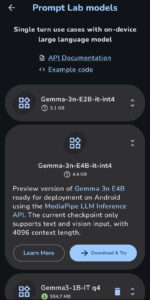
It will download once and be stored locally
4. Use AI Features Offline
AI Chat
Read Also :- Best AI application ChatGPT
Type a question or prompt
The model will reply instantly (no internet needed)
Ask Image
Upload or take a photo
Ask questions like:
“What is in this image?”
“Describe this object”
Works completely offline after model is downloaded
Prompt Lab
Use pre-made templates like:
“Summarize text”
“Rewrite professionally”
“Explain like I’m 5”
Paste your text and get offline AI output
5. Turn Off Internet (Test Offline Mode)
After the model is downloaded:
Turn off Wi-Fi and data
Use all features normally
6. Optional: Switch Models or Update
Go back to “Model Management”
Remove or switch to a different model if needed
Download newer versions if available
Conclusion
The Google AI Edge Gallery is a game-changer—especially for users in Africa, rural areas, or privacy-conscious environments. It shows the future of AI is not just in the cloud but right in your pocket. If you’re a student, developer, or just curious about AI, this app is worth trying in 2025.

Good
It’s very nice
Ultra-realistic cinematic depth of resolution and diffused for someone
Best ai
Thank you It’s a great job!!
Good
excellent
Best
Ofline Al
Yes very good for me and good for all
God jobs
iam join
Yes
My best technology
Very good
Interested
Thanks
Good
where
No comment
it’s so good